Airtable E-Signatures
Send documents for signature from Airtable
Quotes, contracts and NDAs go out from the Airtable record for signature or one-click acceptance. The sealed PDF comes back to the same record.







Why Airtable teams sign with DocsAutomator
One tool from the Airtable record to the sealed PDF
The sealed PDF comes back to the record
It lands in the attachment field you choose, with a certificate page.
Signers come from your fields
Names and emails come from the record, never typed again.
One tool instead of two automations
Created, sent and filed back in one step, without Zapier or Make.
How to send a document for signature from Airtable
Set it up once. Every record that reaches your trigger gets its document created, signed and filed back on the record.
- 1
Connect Airtable
In DocsAutomator, connect your Airtable account and pick the base and the table the document is about, for example Quotes or Suppliers.
- 2
Add a signature tag to your template
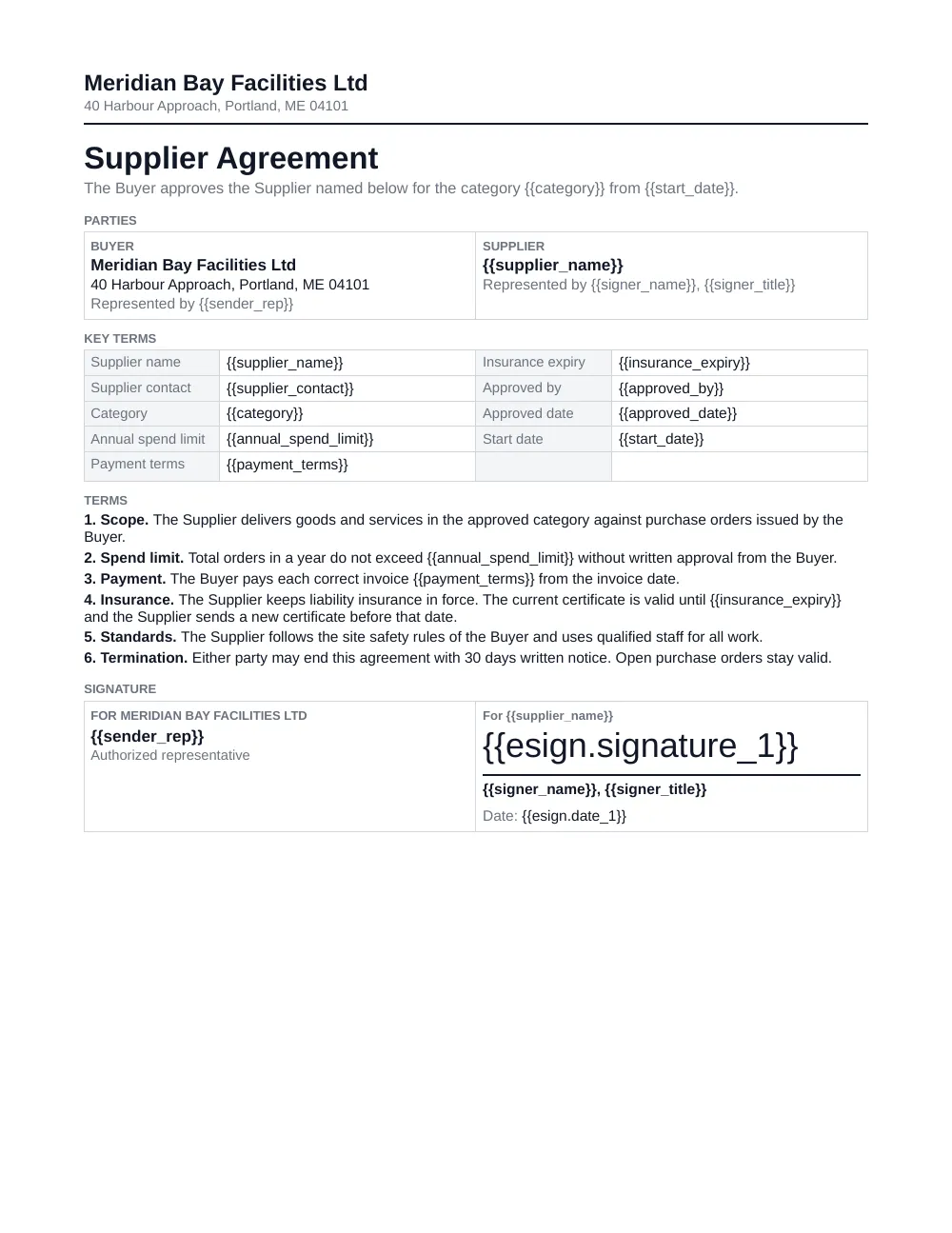
Use a Google Docs or Word template with placeholders for your fields. Type {{esign.signature_1}} where the first person signs and {{esign.date_1}} where the date goes.
- 3
Choose who signs
Turn on Signing and take each signer's name and email from fields on the record. Several people can sign at the same time or one after another.
- 4
Choose where the sealed PDF goes
Under After signing, pick an attachment field on the record. You can also save what the signer fills in, such as a date, a name or a ticked box, into fields.
- 5
Start it from Airtable
Let a field change start it, for example Status set to Send contract. You can also use a button, an Airtable automation or the DocsAutomator extension.
- 6
The signer signs and the record updates
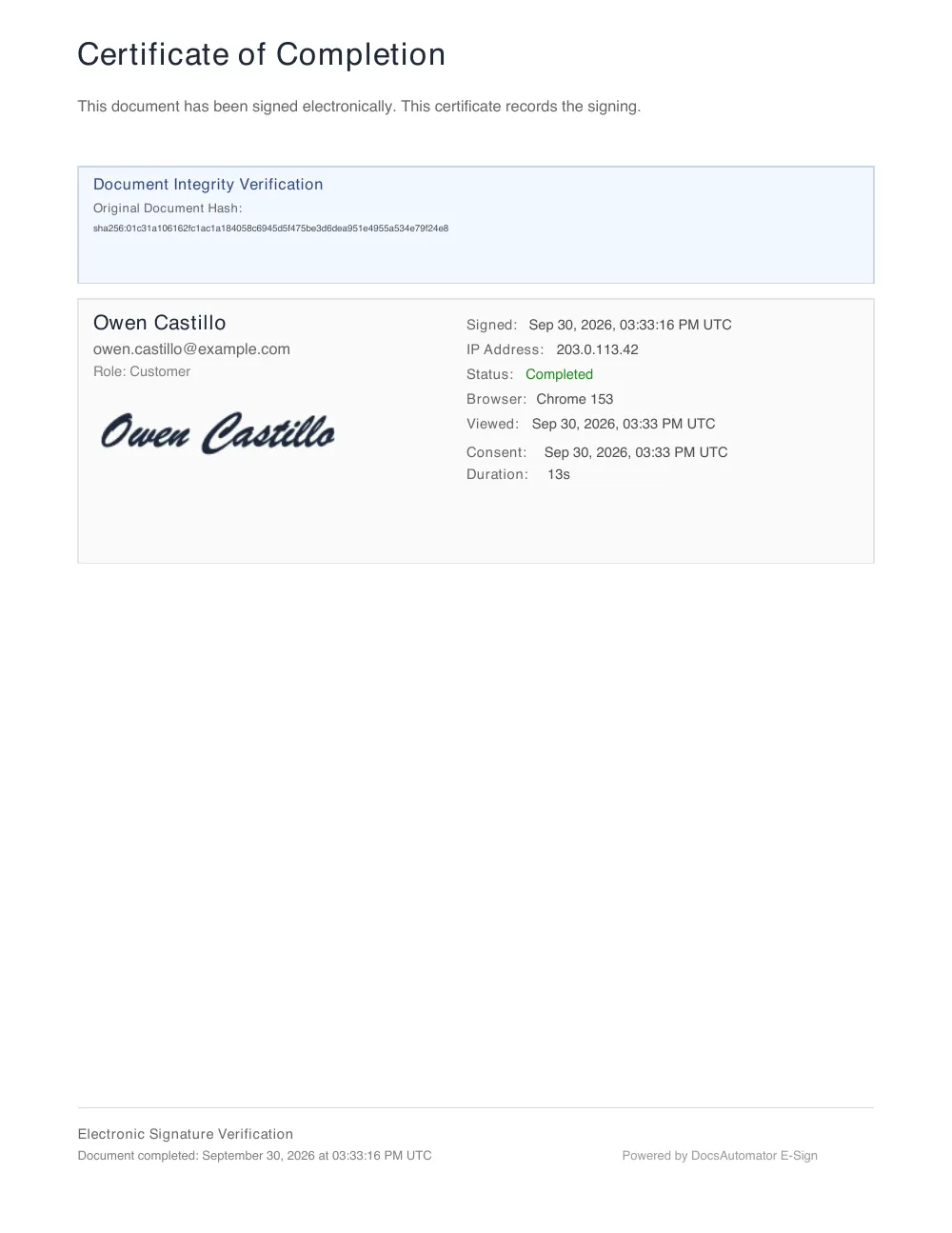
The signer gets an email, opens the document on a phone or a computer and signs without an account. The sealed PDF with its certificate lands in the attachment field.
Start automating & signing in minutes!
Some of the teams / institutions automating and signing their documents with DocsAutomator:







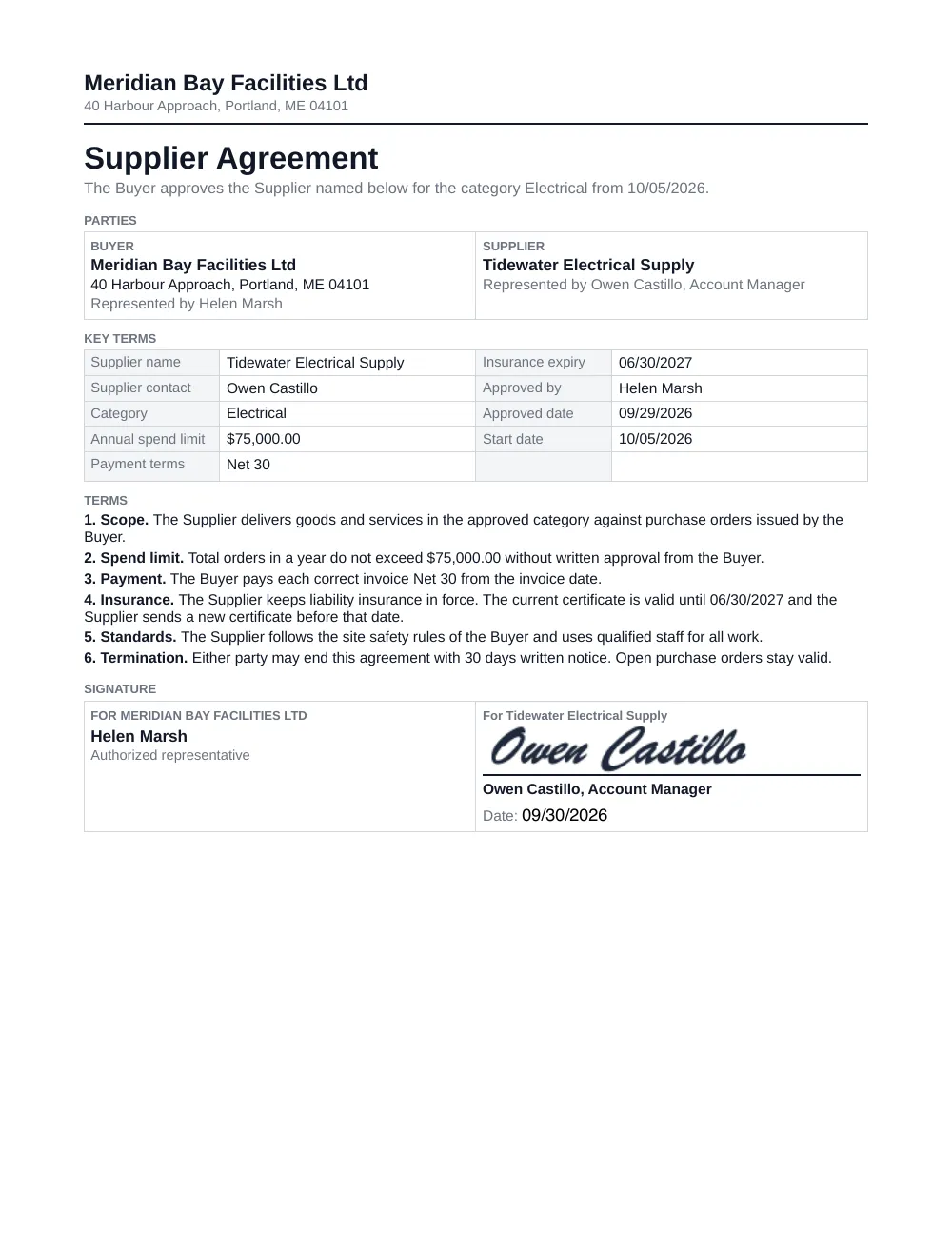
Example: a supplier agreement from an Airtable record
Created from the record and signed on a test page. All names and amounts are fictional.
1. The record in Airtable
- Status
- Send contract
- Supplier contact
- Owen Castillo
- Contact title
- Account Manager
- Contact email
- owen.castillo@example.com
- Category
- Electrical
- Annual spend limit
- $75,000.00
- Payment terms
- Net 30
- Insurance expiry
- 06/30/2027
- Approved by
- Helen Marsh
- Approved date
- 09/29/2026
- Start date
- 10/05/2026
- Signed supplier agreement
- Empty until the supplier signs
2. Your template
3. The signed document
Quotes accepted with one click
For a quote, an offer or a purchase order, a yes is enough.
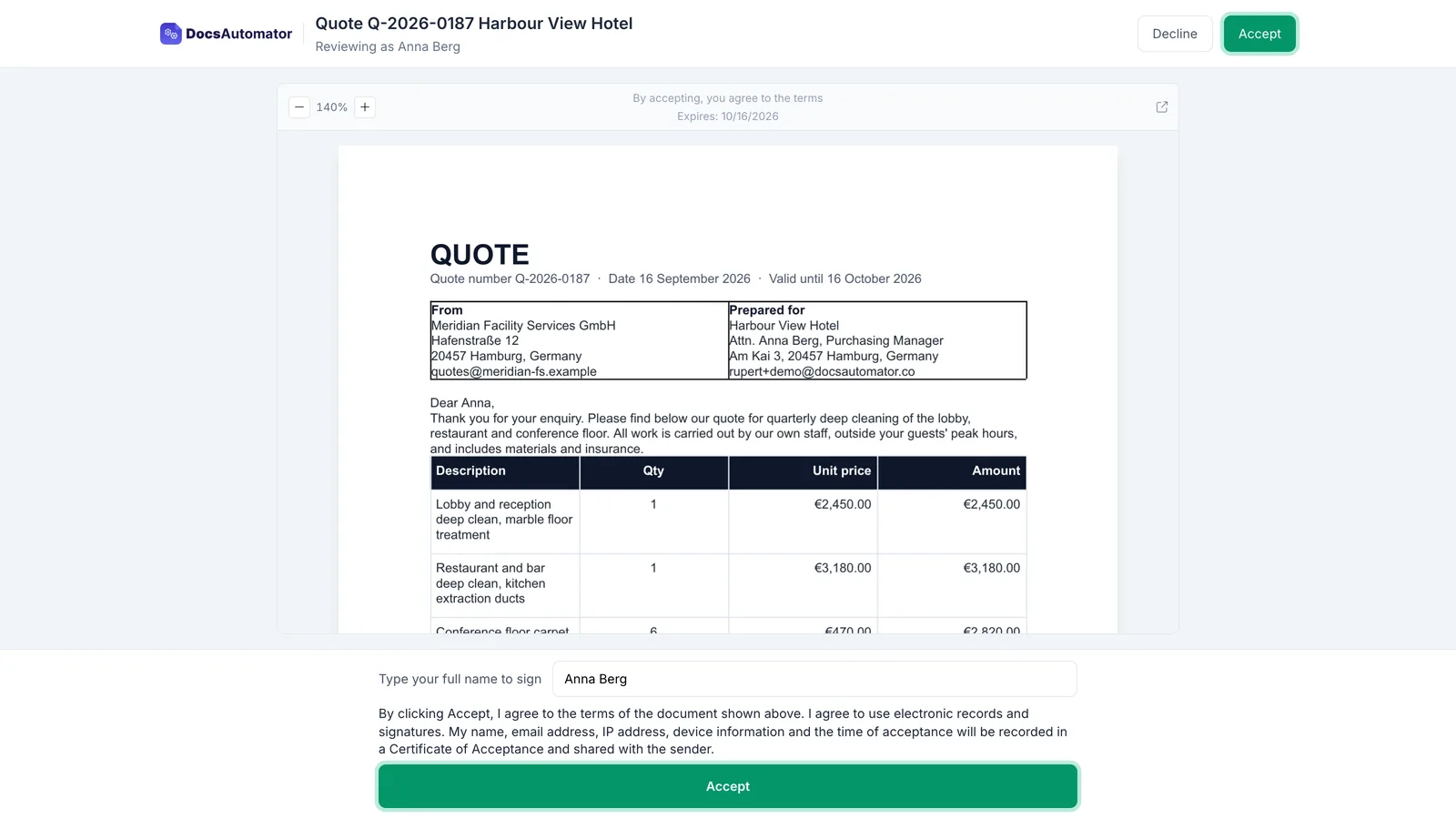
Choose Acceptance instead of Signing. Your client opens the quote from the email and clicks Accept.
- Nothing to draw and no account to create
- They can type their name, or decline with a reason
- The sealed PDF goes back to the record with a Certificate of Acceptance
Using DocuSign or PandaDoc with Airtable
Neither has an extension in the Airtable Marketplace (checked October 2026), so teams connect them through Zapier or Make.
The usual route: two tools and two automations
One automation sends the file to be signed. A second one brings the signed file back.
The one-step route with DocsAutomator
The document is created from the record, sent and filed back in one step.
Moving from another signing tool?
Whether you use DocuSign, PandaDoc or another tool: our founder moves your templates, signers and flows over with you personally, at no extra cost.
Book a call with our founderWhat to check in an e-signature tool for Airtable
Seven questions to ask before you pick one.
- The signed PDF comes back to the record. The signed file should land in an attachment field without a second automation.
- Signers come from your fields. Names and emails should come from the record, not be typed again for each request.
- Line items from linked records. Quotes and orders need rows from linked tables, grouped and totalled.
- Templates your team can edit. Google Docs, Word or PDF, so the people who own the wording keep editing it.
- Signing and acceptance. A contract needs a signature. A quote often needs only a click on Accept.
- Price per person or per signature. Check whether each team member needs a paid seat, and whether signing costs extra on top of the plan.
- Proof on every PDF. A certificate and an audit trail that record who signed, when and from where.
Questions about e-signatures for Airtable
Customer Voices
Don't take our word for it. Here's what our customers say about us:
DocsAutomator has decreased the amount of time I spend making the repeatable and batch documents I need for my business. [...] It's easy to set up and a very user friendly no code tool. Plus they are always making improvements. Love it.

Patrick Beseda
DocsAutomator has proven to be an invaluable asset for our business, streamlining the automation of emails and documents in a seamless and efficient manner. It has significantly simplified tedious tasks, making our workflow more efficient.

Thembinkosi Malefo
DocsAutomator have helped me creating super complex documents which I had no clue how to create these with other tools as Zapier or Make.com. I have never been helped so quickly. I'm currently recommending this tool to all of my friends.

Stefan
This is exactly what our company was looking for. It works fantastic, thank you!
Jordy Urbanski
DocsAutomator has been a game-changer for our company when it comes to creating documents both internally and for our clients. The tool's ease of use has made it simple for us to design documents without the need for technical expertise.
Jesús Gazca
I have been using DocAutomator for about 2 weeks now and it is fantastic! Very easy to set up the configuration between Google Docs, Airtable, and DocAutomator.
Jason Wilson
More integrations

Claude
Create documents, send them for signing and create e-invoices from a chat with Claude.

ChatGPT
Create documents, send them for signing and create e-invoices from a chat with ChatGPT.
Notion
Notion is the connected workspace where better, faster work happens. Build wikis, manage projects, and run your business.
Google Sheets
Google Sheets is a cloud-based spreadsheet app for real-time collaboration.
Google Forms
Google Forms is a free online tool to create forms to collect and organize data efficiently.

Glide
Glide makes it easy to build custom business software powered by your data, without code.

Softr
Turn your siloed data and workflows into powerful custom software for your business, with AI built in.

SmartSuite
SmartSuite replaces disconnected point solutions with a modern platform that scales across functions.

Noloco
The fastest way to create custom internal tools, client portals, CRMs and other business tools.

ClickUp
ClickUp brings teams closer together with connected workflows, docs, real-time dashboards and more.

Zapier
You can automate a simple task or build an entire automated system, all on Zapier.

n8n
Flexible AI workflow automation for technical teams.

Make
AI automation you can visually build and orchestrate in real time.

API
Use our API to build connect your custom app and use the power of DocsAutomator.
Ready to send your first document for signature from Airtable?
Join 1,200+ businesses saving hours on document creation
Unlimited testing, no credit card required