

- ZUGFeRD: a PDF/A-3 file with the e-invoice data (EN 16931 profile) embedded. People read the PDF; accounting software reads the data inside it.
- XRechnung: an XML file (XRechnung 3.0) next to your PDF. Public-sector buyers in Germany usually ask for this format.
DocsAutomator creates a valid e-invoice format from your data. It does not check your tax treatment and does not give tax advice. Ask your tax advisor which VAT treatment and format apply to you.
Turn on the add-on
- Open Settings, then Add-ons.
- Switch on E-invoice (ZUGFeRD / XRechnung). Only owners and admins can do this.
- Click Settings next to the add-on and enter your seller details.
Seller details
You enter the seller details once. Every e-invoice automation uses them, unless you give one automation a different seller (see Seller for one automation). The Swiss QR-bill has its own seller details.Set up an automation
Open an invoice automation and find its E-invoice section. Switch on Create an e-invoice, then fill in the parts below. Most fields suggest a match from your data by name.Format
- Format: ZUGFeRD or XRechnung.
- Document type: Invoice or Credit note. A credit note can also carry the original invoice number.
- VAT treatment: one of the treatments below.
Seller for one automation
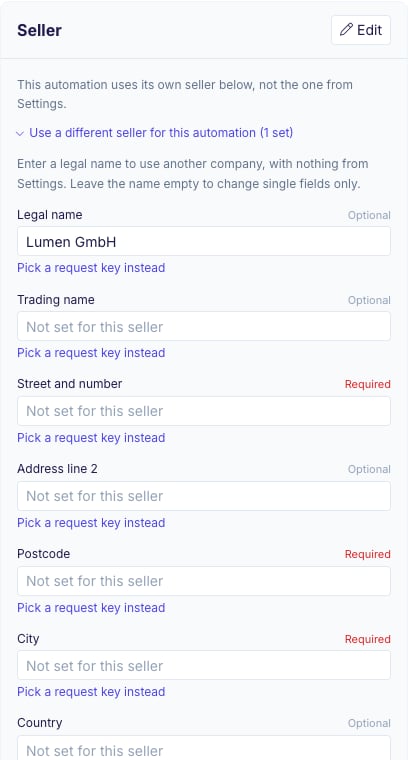
When one workspace invoices for several companies, an automation can use a different seller. Open Use a different seller for this automation in the automation’s Seller card. It lists every seller field.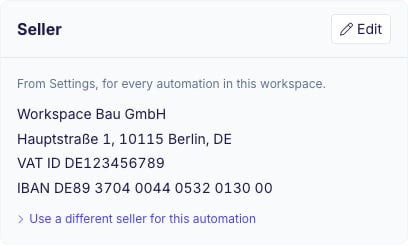
- With a legal name: the automation uses another company. Nothing comes from Settings, so the invoice never mixes your company’s details, such as your IBAN, with the other company’s. Fill in every field this company needs. An empty required field stops the run, for example with “Seller IBAN is empty for this automation’s seller.”
- Without a legal name: the automation keeps your company and changes single fields only, for example another city or another bank account. Empty fields use the value from Settings, and they follow when you change Settings later.
Invoice and buyer fields
Map each field to a field of your data source, or enter a fixed text (for example a fixed buyer country “DE” or fixed payment terms).
Leitweg-ID: public-sector buyers in Germany give you a Leitweg-ID (for example
991-12345-67). Map it to Leitweg-ID or buyer reference. For other buyers of an XRechnung, use the reference they give you.
Line items
Pick where the lines come from: a linked table or relation (Airtable, Notion, SmartSuite), the subtasks or a relationship field (ClickUp), another sheet (Google Sheets), or theline_items_1 list of each request (API and the other request-based sources). A Google Forms response has no line items, so the response itself is one line.
A discount line can have a negative price; the e-invoice turns “1 × -10.00” into “-1 × 10.00”, the same amount.
Totals
Map the Gross total field that your document prints. Net total and VAT total are optional. DocsAutomator recalculates every total from the lines: each line is quantity × net price, VAT is calculated per VAT rate on the total of those lines, and the gross total is net plus VAT. The run stops when a mapped total differs from the recalculated one by more than 1 cent. Within 1 cent, the e-invoice carries the amount your document prints, so the PDF and the e-invoice show the same numbers.Final invoices
A final invoice (Schlussrechnung) lists all the work and then deducts the partial invoices the buyer has already paid (Abschlagsrechnungen). Map Amount already paid in the Invoice card to the field that holds the paid amount.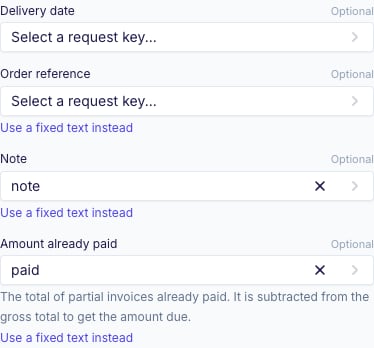
- Map Gross total to the full gross total of all lines, as before, not to the amount still to pay.
- The e-invoice carries the amount already paid, and the amount due is the gross total minus the amount already paid.
- When the amount already paid equals the gross total, the amount due is 0.
- The run stops when the amount already paid is negative (“Amount already paid cannot be negative.”) or larger than the gross total (“Amount already paid cannot be larger than the gross total.”).
Values DocsAutomator reads
- Amounts: euros only. German and English notation both work (
1.234,56,1,234.56,1.234,56 €). An amount with another currency sign, such as$4,887.50, stops the run with “is not in euros”. - Dates:
2026-10-31,31.10.2026and written dates such as31. Oktober 2026orOctober 31, 2026. A date that can be read two ways, such as03/04/2026, stops the run. - Linked records: a buyer field mapped to a linked customer (Airtable linked record, Notion relation, SmartSuite linked record) uses the customer’s name.
Test document
The Test document card in the E-invoice section creates a test document from your data and shows every problem it finds, field by field, next to the preview. Fix them and create another test document until the card shows no problems. Test documents are free and do not count against your plan. Their e-invoice is valid, but it is marked as a test: the invoice number starts withTEST- and a note says “Testdokument, keine Rechnung. Test document, not an invoice.”
Where the files go
ZUGFeRD: the PDF is the e-invoice. It goes wherever your automation sends the PDF: the data source field, Google Drive, email and the API response. XRechnung: the PDF goes where it always goes, and the XML file goes to the places below.
With every data source, the XML is also saved next to the PDF in your Google Drive folder and attached to the automation’s email, when the automation uses them. OneDrive and Dropbox receive only the PDF for now.
Settings that do not combine with an e-invoice
- Signing and acceptance: an e-invoice cannot be signed. Turn off signing for the automation first.
- Merge PDFs: a ZUGFeRD PDF cannot include merged PDFs. Turn off Merge PDFs, or choose XRechnung.
- PDF templates and fonts: a ZUGFeRD PDF needs every font embedded. If your PDF template uses fonts that are not embedded, embed them in the template, or choose XRechnung.
Common messages and fixes
Archiving
Keep every e-invoice for 8 years in its original file.E-invoices from the API and AI clients
- API: see Create document from API.
- Claude, ChatGPT and other MCP clients: see DocsAutomator MCP.